

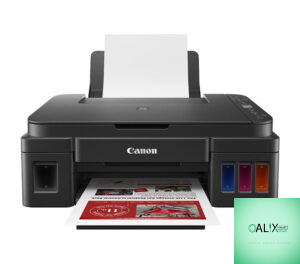


Canon PIXMA G3411 MultiFunction Printer
Original price was: KSh 30,000.00.KSh 24,000.00Current price is: KSh 24,000.00.
The G3411 from Canon is an excellent printer choice for small businesses and middle-sized firms. This printer will help you save your printing costs without compromising on performance and quality. Canon PIXMA G3411 is an all in-one printer, great printer for home use. With this device, you can produce high-yield prints at an extremely low-cost per page. You can also print from your smart device or cloud services through its wireless connection. Buy this printer from Nairobi Computer Shop and enjoy high-quality and vivid photos.
Canon Pixma G3411 features
High-Quality Results
This printer uses Canon’s FINE technology and hybrid ink system that yields high-quality and fine print. The hybrid ink system comes with pigment black to sharpen files and dye-based colors to produce clear borderless photos.
High Page Yields
The incredible page yield is one reason that most people love this 3 in one printer. The Canon PIXMA G3411 can produce up to 12000 pages from two black bottles of ink and 7000 pages from a set of color bottles. Why go for expensive printers while you can buy a cheap colored printer and still achieve your goals? Get this printer from the best printer shop in Nairobi, and let’s help you reach your printing target.
Connectivity
The Canon PIXMA G3411 printer allows you to print and scan wirelessly from your smart device and cloud services. You can print directly from your smartphone using the Canon PRINT app for both Android and iOS. The app also comes with inbuilt PIXMA Cloud Link and Mopria support.
Multi-Function
The G3411 Canon printer is multifaceted, with the ability to print, copy, and scan large volumes of documents with ease. The printer uses Canon’s reliable FINE ink system. You never have to buy a scanner separately. Do all your stuff comfortably with this printer.
Operation
This printer comes with a 1.2 inches mono segment LCD to ease the operating process. The LCD allows you to select multi copies and check Wi-Fi status. Canon placed the ink tanks in the front of the printer so that you can monitor the ink levels easily.
Summarized Canon G3411 Functions
- Three in one Print, Copy, Scan
- Print Resolution: Up to 4800 x 1200 dpi
- Approx. Print Speed: Up to 8.8 ipm (Monochrome), Up to 5.0 ipm (Colour)
- Borderless printing: A4, Letter, 20x25cm, 13x18cm, 13x13cm, 10x15cm
- Supported Paper Types: Plain Paper, High-Resolution Paper (HR-101N), Photo Paper Plus Glossy II (PP-201), Photo Paper Pro Luster (LU-101), Photo Paper Plus Semi-gloss (SG-201), Glossy Photo Paper “Everyday Use” (GP-501), Matte Photo Paper (MP-101), Envelope
- Supported Paper Sizes: A4, A5, B5, 10x15cm, 13x18cm, 20x25cm, Envelopes (DL, COM10), Letter, Legal
- Scanner Type: CIS flatbed photo and document scanner
- Display: LCD (1.2 inches Segment Mono
- Interface; Hi-Speed USB Port. Wi-Fi
- Interface Type: PIXMA Cloud Link (from smartphone or tablet)
- Supported Mobile Systems: Android, iOS, Windows 10
- Power Consumption: 0.2 Watts (off), 1.2 Watts (Standby, connected to PC through Wi-Fi and Scanning lamp off) 1.2 Watts (all ports connected and scanning ports off), 11 Watts (Scanning)
- Connectivity options: Wi-Fi, Cloud Link
- 1-year warranty from Nairobi Computer Shop
- Buy from an authorized Canon dealer
Conclusion
The Canon G3411 is among the best cheap printers for people with a low budget. Whenever you go shopping for an affordable printer, this can be a great choice. You can now enjoy quick print and scan time with the Canon PIXMA G3411. This printer will not occupy much of your space. With wireless technology, this device allows you to take control of your printing projects with ease. Get the Canon PIXMA G3411 now and enjoy a printing experience like no other. At Nairobi Computer shop, we always give you the best choices for printers and computers. Combine this printer with a cheap laptop such as HP Elitebook 8470, and you are good to go. You need to install the Canon Pixma G3411 printer drivers and start printing.


Related products

Apple Magic Mouse 1 A1296 MB829LL/A GENUINE OEM SEALED
| Condition: |
New: A brand-new, unused, unopened, undamaged item in its original packaging (where packaging is |
Brand: | Apple |
| Connectivity: | Wireless | Model: | A1296 |
| MPN: | MB829LLA | Tracking Method: | Laser |
| Color: | White | Number of Mouse Buttons: | 2 |
| Features: | 4-Way Scrolling, Ergonomic, Battery Status Indicator, Adjustable DPI, Programmable Buttons, Grip, Rechargeable, Silent | Custom Bundle: | No |
| Number of Buttons: | 1 | Mouse Type: | Standard |
| Type: | Standard Mouse | UPC: | 0885909270354 |


Apple Thunderbolt Cable (0.5 m) – White
Overview
What’s in the Box
Tech Specs
Connections


Belkin 4K Mini DisplayPort to HDMI Adapter
Compatibility
Mac Models
- MacBook Air (13-inch, Early 2015 - 2017)
- MacBook Air (11-inch, Early 2015)
- MacBook Pro (Retina, 13-inch, Late 2012 - 2015)
- MacBook Pro (Retina, 15-inch, Mid 2012 - 2015)
- iMac (Retina 4K, 21.5-inch, Late 2015)
- iMac (Retina 5K, 27-inch, Late 2014 - 2015)
- Mac Pro (Late 2013)
- Mac mini (Late 2014)

Epson LQ-690 Impact dot matrix Printer
Why the Epson LQ-690?
Designed with the dot matrix user in mind, our latest model has an impressive print speed of up to 529 cps. This flexible and compact printer can easily handle cut sheets, continuous paper, labels, envelopes and cards. It has a built-in Print Speed Enhancer to increase the speed of bit image printing, making it an ideal printer for those in the most demanding of work environments.


Reviews
There are no reviews yet.